

Keeping accurate mileage records is an important part of managing business travel, vehicle expenses and tax documentation. Whether you are self-employed, run a small business or regularly use a personal vehicle for work, recording each business journey can become difficult when relying on paper notes or manually maintained spreadsheets.
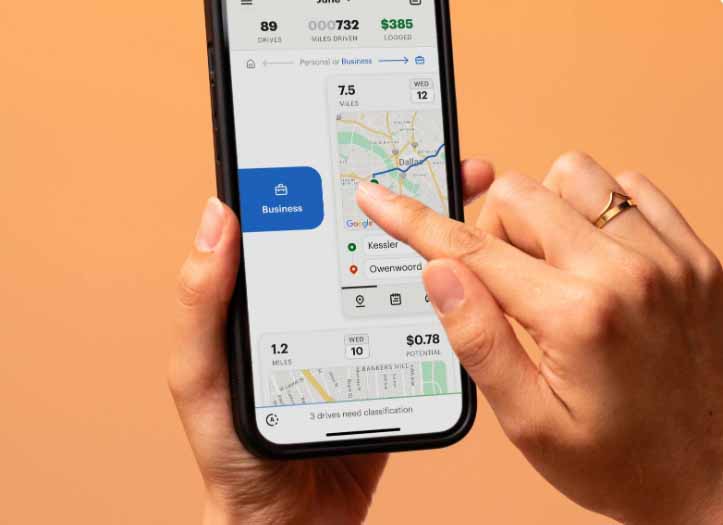
A Mileage Log App can make this process more organised by helping you record journeys, distances, dates and other relevant information in one place. Depending on the features available, mileage tracking software may also use GPS technology to automate parts of the process, reducing the need for manual entry.
However, using an app alone does not automatically guarantee accurate records. Understanding what information should be recorded and developing consistent tracking habits can help create more complete and reliable mileage documentation.
Why Accurate Mileage Records Matter
Mileage records can be useful for businesses and individuals who need to monitor work-related vehicle use. They can help separate business journeys from personal driving and provide a clearer picture of vehicle-related costs.
Accurate records may also be relevant when preparing tax documentation, depending on the rules that apply to your location and circumstances. Tax authorities generally expect records supporting business-related deductions or expense claims to contain sufficient information to substantiate the amounts being claimed.
Good mileage records can help answer basic questions such as:
- When did the journey take place?
- Where did the journey begin and end?
- How far was the journey?
- What was the business purpose?
- Was the journey entirely business-related?
- Were there any personal or non-business portions?
Maintaining this information consistently can make recordkeeping easier throughout the year.
Choose a Mileage Log App With Useful Tracking Features
The first step towards maintaining accurate records is choosing an app that supports the information you actually need to record.
Different apps offer different combinations of manual and automatic tracking features. Before choosing one, consider whether it provides functions such as:
- GPS-based mileage tracking
- Manual trip entry
- Business and personal trip classification
- Date and time recording
- Start and destination details
- Mileage categorisation
- Notes for business purposes
- Mileage reports
- Data export
- Record storage and backup
The most useful features will depend on your driving patterns and recordkeeping requirements. Someone who makes several business trips each day may benefit from automation, while someone who drives for work occasionally may prefer straightforward manual entry.
Record Trips Consistently
Consistency is one of the most important factors in maintaining reliable mileage records.
If you wait several days or weeks before entering journeys, it can become difficult to remember the exact distance, destination or reason for each trip. This can result in incomplete records and unnecessary administrative work.
Instead, make mileage tracking part of your normal driving routine.
When a business journey is completed, check that the trip has been recorded correctly. If your app requires manual confirmation, review the details while they are still fresh in your memory.
A simple routine can help:
- Start or enable mileage tracking before a business journey.
- Confirm the trip has been recorded after reaching your destination.
- Classify the journey appropriately.
- Add the business purpose where necessary.
- Review your records regularly.
Use GPS Tracking Carefully
GPS technology can make mileage tracking more convenient by automatically detecting routes and estimating distances. However, automated tracking should still be reviewed.
GPS data can sometimes be affected by signal limitations, incorrect route detection or trips that contain both business and personal driving.
For example, you might leave home for a business appointment, make a personal stop and then continue to your destination. The entire journey may not qualify as business mileage under the rules applicable to your situation.
A Mileage Log App with trip classification features can help you review these journeys and identify which portions should be treated as business or personal.
Add a Clear Business Purpose
Mileage records are more useful when they explain why a particular journey was made.
Simply recording a distance may not provide enough context for your records. Adding a short description can make the purpose of the journey clearer.
Depending on your work, descriptions might include:
- Client meeting
- Business conference
- Supplier visit
- Worksite inspection
- Delivery
- Training session
- Business appointment
- Temporary work location
Keep descriptions concise but specific enough to identify the reason for the journey.
Separate Business and Personal Mileage
One of the biggest challenges in mileage tracking is distinguishing business travel from personal use.
If you use the same vehicle for both work and personal activities, your records should clearly distinguish between the two categories.
For example, travelling from your home to a personal appointment should not automatically be classified as business mileage simply because you use the vehicle for work on other days.
Regularly reviewing trip classifications can help prevent accidental mixing of personal and business journeys.
Check Your Records Regularly
Even if your app automatically records journeys, it is useful to review your mileage records regularly rather than waiting until the end of the year.
A weekly or monthly review can help you identify missing or incorrectly categorised trips while the details are still easy to verify.
Look for:
- Missing journeys
- Duplicate trips
- Incorrect distances
- Incorrect dates
- Incorrect business classifications
- Unclear destinations
- Missing business purposes
Correcting small errors regularly is generally easier than trying to reconstruct an entire year’s travel history later.
Keep Supporting Documentation
Mileage records are only one part of documenting business travel. Depending on your circumstances, you may also need supporting documents that demonstrate the reason for particular journeys or related expenses.
For example, relevant supporting information could include appointment calendars, invoices, work orders, meeting records or other business documents.
A Mileage Log App can help centralise mileage information, but it should not necessarily replace other records that may be relevant to your business or tax documentation.
Keeping related information organised can make it easier to verify a journey if questions arise later.
Back Up Your Mileage Records
Digital records can be convenient, but they should still be protected against accidental loss.
If an app provides cloud storage, data export or backup functionality, understand how those features work. Regularly exporting important records can provide an additional copy that can be retained with your other business documents.
Consider maintaining records in a format that can be easily accessed when preparing financial or tax documentation.
Before relying on any app, also review its data retention, export and backup options to understand how your information is stored.
Avoid Relying Entirely on Memory
One of the most common mileage-recording mistakes is trying to reconstruct journeys from memory.
A person may remember visiting a client but forget the exact date, route or distance. Small omissions can accumulate over time.
Using automatic tracking where appropriate, combined with regular manual reviews, can reduce the amount of information you need to remember.
The goal is not simply to record as many miles as possible. The goal is to maintain an accurate record of legitimate business journeys supported by appropriate details.
Review Your Records Before Reporting or Filing
Before using mileage information for accounting, expense reporting or tax purposes, review the complete record.
Check that the mileage totals are reasonable and that trips have been categorised correctly. Look for unusual entries that may require clarification and make sure supporting documentation is available where needed.
Tax rules vary by country and can change over time, so mileage records should be maintained according to the requirements applicable to your particular situation. An accountant or qualified tax professional can provide advice about specific reporting obligations.
Final Thoughts
Accurate mileage tracking does not have to be complicated. The key is to record journeys consistently, distinguish business and personal travel, document the purpose of work-related trips and review records regularly.
A Mileage Log App can simplify these tasks by combining manual entries, automated tracking and organised reporting in a single system. However, accuracy still depends on reviewing automatically captured information and keeping appropriate supporting documentation.
By developing a consistent mileage-recording routine and checking your records throughout the year, you can create clearer documentation and reduce the stress of reconstructing business journeys later.
Also Read: Can Smarter Delivery Tracking Keep Food Orders on Schedule?
How to Keep Accurate Mileage Records With a Mileage Log App

How to Keep Accurate Mileage Records With a Mileage Log App
Keeping accurate mileage records is an important part of managing business travel, vehicle expenses and tax documentation. Whether you are…
Amazon Vine Login: Official Access and Sign-In Help
For Amazon Vine login in the United States, start at the Amazon Vine portal and sign in with the Amazon…