

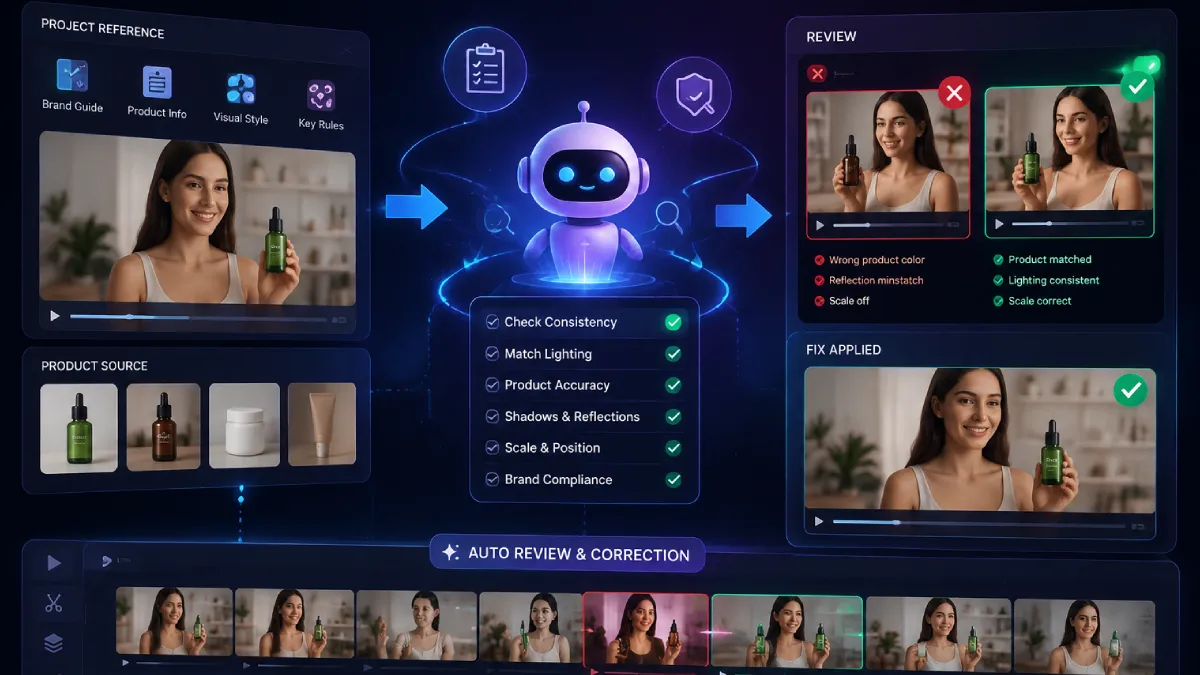
Product swaps in video ads require more than replacing one item with another. The new product needs to match the scene, lighting, movement, and brand style so the final video feels natural. AI Ads workflows can help teams create more variations faster, but quality depends on maintaining product consistency, reviewing edits, and correcting mismatched shots before publishing.
Creating a product video often starts with a simple idea: keep the winning ad structure and replace the product. The challenge begins when the replacement does not look like it belongs in the original scene.
A product may change size between shots. Reflections may look different. The lighting on the item may not match the environment. These small details can make an ad feel disconnected.
This is where AI Ads workflows are changing how brands approach creative testing. Instead of rebuilding every video from scratch, teams can create variations while keeping important visual elements consistent.
The key is not just generating a new product shot. It is making sure every frame follows the same creative direction. From product placement to camera movement, every detail needs to support the final story.
A seamless product swap combines careful planning, strong references, and review systems that catch visual problems before the final edit. This guide explains how brands can approach product swaps and where AI can help.
Why do product swaps matter in video ads?
Product swaps help brands create more versions of successful creative without rebuilding the entire production process. They allow teams to test different products, audiences, markets, and offers while keeping the original concept intact.
For example, an ecommerce brand may have one strong lifestyle ad featuring a skincare product. Instead of creating a completely new campaign for every item, the same structure can be adapted for different products.
This approach works best when the creative foundation stays consistent:
- Same camera movement and framing
- Similar pacing and storytelling
- Matching lighting and environment
- Correct product details in every scene
A poor swap can make the product appear added later. A good swap makes viewers feel like the product was always part of the original shoot.
AI Ads tools are becoming useful here because they can speed up creative variations. However, the process still needs clear product references and human review to maintain quality.
How can you make product swaps look natural in AI Ads?
Product swaps look natural when the replacement product follows the original video’s visual rules. This includes matching scale, lighting, shadows, reflections, camera angles, and movement. The goal is to make the new product feel like it was filmed in the same environment.
The first step is creating a strong product reference. A single image is often not enough because products have different details from every angle.
Brands should provide:
- Multiple product views
- Close-up details
- Different lighting examples
- Packaging information
- Material descriptions
For example, a watch advertisement needs accurate metal reflections, strap texture, and wrist placement. A clothing ad needs correct fabric movement and shape.
Product consistency becomes especially important when creating multiple AI Ads variations. Each version should maintain the same product identity instead of generating a slightly different item every time.
A helpful approach is to lock the product before creating multiple scenes. This gives every shot a reliable visual reference and reduces inconsistencies during generation.
What causes mismatched cuts when swapping products?
Mismatched cuts usually happen when the replacement product does not follow the visual language of the original footage. Small differences in position, lighting, or movement can make a transition feel unnatural.
Common problems include:
- The product changes shape between frames
- The camera angle does not match
- The product size feels incorrect compared to surrounding objects
- Shadows move differently from the original scene
- Reflections do not match the environment
- The product appears sharper or softer than the rest of the shot
These issues are easy to miss when reviewing individual clips. They become more noticeable when the complete ad plays from start to finish.
A good AI Ads workflow treats every product swap as a continuity task. The replacement should not only look good on its own. It should also connect naturally with the shots before and after it.
For teams working on multiple campaigns, maintaining a consistent brand process also matters. Clear creative systems help marketing teams scale production without losing quality, as explained in this guide about building stronger SaaS marketing strategies.
How can AI help review product swaps before publishing?
AI can help review product swaps by checking generated clips against the original project requirements. It can identify visual differences, compare shots, and help teams catch problems before final delivery.
Modern AI video workflows are moving beyond simple generation. The review stage is becoming an important part of production because models can create content quickly, but they may also introduce unexpected changes.
A face can look slightly different. A hand can have incorrect details. Lighting can shift between connected shots.
Normally, creators need to inspect every frame manually. With invideo Agent, the review process becomes part of the workflow. The agent checks generations against the project context, including approved characters, locations, visual rules, and creative decisions.
The Self-review & auto-correction capability allows creators to define specific checks, such as protecting product details, maintaining visual style, or preventing certain errors. The system reviews each generation against the rules set for the project and helps fix issues before they move forward.
This does not replace creative decisions. Instead, it reduces repetitive checking so teams can spend more time improving the idea, pacing, and overall ad direction.
How does invideo Agent simplify product swap workflows?
Invideo Agent helps brands approach product swaps as a complete creative workflow instead of isolated clip generation. It keeps project information, product references, and creative decisions connected across the production process.
For advertising teams, this matters because successful campaigns often require many versions. A winning product video may need different products, formats, languages, or audience variations.
The workflow can include:
- Uploading brand guidelines and product references
- Creating a consistent visual direction
- Building multiple ad variations
- Reviewing generated scenes
- Refining the final versions
For product-focused AI Ads, the agent can help maintain consistency by using project context as the reference point. Teams can provide product details, approved visuals, and brand rules so future generations follow the same direction.
The advantage is not only speed. It is reducing the repeated work involved in explaining the same creative requirements for every new version.
What role does AI editing play after product generation?
AI editing helps teams refine product swap videos after the initial generation stage. It connects approved clips, external footage, audio, and brand assets into a finished advertisement.
A product swap may look correct in individual clips but still need adjustments in the final timeline. The pacing may feel slow. A transition may need improvement. A product shot may need to appear earlier.
Slate, the editing workspace inside invideo Agent, helps users move from approved clips to a complete timeline. It can use project context, including scripts, shot breakdowns, approved takes, and creative instructions, without requiring the project to be explained again.
Editors can review the full sequence, replace shots, adjust timing, and create alternate versions. This makes it easier to test different edits while keeping the same product and campaign direction.
For brands creating many AI Ads variations, this editing stage helps maintain consistency across every final version.
How can brands scale product swap campaigns?
Brands can scale product swap campaigns by creating a repeatable system. The focus should be on keeping the creative foundation stable while changing specific elements.
A scalable workflow usually includes:
- Create one strong reference ad
- Lock the product appearance and visual style
- Define what can change and what must stay the same
- Generate multiple variations
- Review each version before publishing
Invideo Agent Two supports this type of project-based workflow by keeping long-term context across creative work. It can understand uploaded materials such as scripts, brand books, videos, and references, helping teams avoid repeating the same instructions during production.
This approach is useful for brands creating multi-product campaigns where consistency matters across many videos.
Conclusion
Creating seamless product swaps requires more than replacing an object in a video. The new product must match the original scene, from lighting and movement to scale and style.
AI Ads workflows can help brands produce more creative variations, but quality depends on strong references, careful review, and consistent editing.
By combining automation with creative control, teams can test more ideas without losing the visual quality that makes an ad effective.
Frequently Asked Questions
How do AI Ads help with product video creation?
AI Ads help brands create and test video variations faster by supporting tasks such as concept development, scene creation, editing, and creative adaptation. They are most effective when combined with clear product references and human review.
What should brands provide before creating a product swap?
Brands should provide multiple product images, different angles, close-up details, packaging information, and examples of how the product appears in real environments. These references help maintain accuracy across generated scenes.
Can AI automatically detect mismatched cuts?
Some AI workflows can review generated content against project rules and references. For example, invideo Agent checks generations against approved project context, including characters, locations, and visual decisions.
Can brands create multiple product ad versions with AI?
Yes. AI workflows can help brands create multiple versions of an advertisement by changing products, formats, locations, or messaging while keeping the overall creative direction consistent. The quality depends on maintaining strong references throughout the process.
What is the difference between generating a product swap and editing one?
Generation creates new visual content based on instructions and references. Editing focuses on arranging, refining, and improving the final sequence. A complete workflow usually needs both steps to create polished video ads.


Adam Back Denies Being Satoshi Nakamoto
A British cryptographer has supposedly been outed as the creator of Bitcoin. According to the New York Times, Adam Back…
The Tech-Savvy Traveler’s Guide to Urban Adventures
Your smartphone has become the ultimate travel buddy for exploring a new city. It’s your map, your translator, your camera,…