


Adopting talking photo ai for software demos lets product managers, developer advocates, and solutions engineers add a consistent human presenter to two-minute feature walkthroughs and sprint changelog clips without setting up a home webcam studio after every deployment. When an engineering team ships UI updates every two weeks, keeping the presenter intro modular means a minor button or API parameter change only requires updating a 20-second script block rather than re-shooting an entire screen-share recording.
Software documentation and changelog pages often suffer from the same problem: users either face a wall of bulleted ticket summaries or a 14-minute uncut screen recording recorded late on a Friday afternoon with uneven laptop microphone audio. Enterprise buyers and technical evaluators want to know what changed, who it affects, and which settings they need to toggle in the first 45 seconds.
At the same time, developer relations and product marketing teams rarely have time to record studio-lit presenter intros for every minor version release. Combining clean UI screen captures with a standardized talking portrait intro solves the consistency problem while keeping production time under half an hour per release note.
Why talking photo AI for software demos ages better than uncut webcam recordings
When a product manager records a live picture-in-picture webcam video while clicking through a staging environment, three maintenance headaches appear almost immediately:
- Audio and visual drift across releases: One engineer records in a bright office with a USB condenser mic; the next records in a dim bedroom on Bluetooth earbuds. The documentation center quickly looks like a patchwork of unrelated clips.
- Stale intros when a single parameter changes: If an API endpoint path or a billing tier name changes three weeks later, the entire video must be re-recorded because the presenter’s webcam bubble is baked into the timeline.
- High drop-off during login and navigation filler: Viewers watching a product demo do not need to watch ten seconds of cursor movement while a presenter logs in or searches for a menu tab.
Documentation research from the Nielsen Norman Group on instructional video usability and technical writing guidance in the Google Developer Documentation Style Guide both emphasize front-loading the user outcome and stripping out unnecessary conversational filler.
| Demo production method | Average update time when UI changes | Audio and lighting consistency | Best fit in the product lifecycle |
| Live uncut webcam + screen share | 45 to 60 minutes to re-record from scratch | Varies by presenter laptop and room acoustics | One-off internal bug reproduction clips |
| Studio-filmed green-screen presenter | Several days of booking and post-production | High, but expensive to reshoot for minor updates | Annual flagship keynote announcements |
| Modular talking portrait + UI clips | 10 minutes to edit the script and re-export | Uniform voice level, framing, and caption style | Biweekly changelog briefs and help-center demos |
How to structure a 60-second software release walkthrough
Instead of improvising while clicking around the app, break every feature demo into three distinct blocks before generating the presenter track:
1. The 15-second presenter context card (0:00 to 0:15)
Open with a clean presenter frame that answers three questions in two sentences: What is the feature? Which user role needs it? What problem does it remove? When you make a photo speak with AI, a product manager or solutions engineer can use an approved studio headshot to deliver this 35-word opening with crisp pronunciation and synchronized captions.
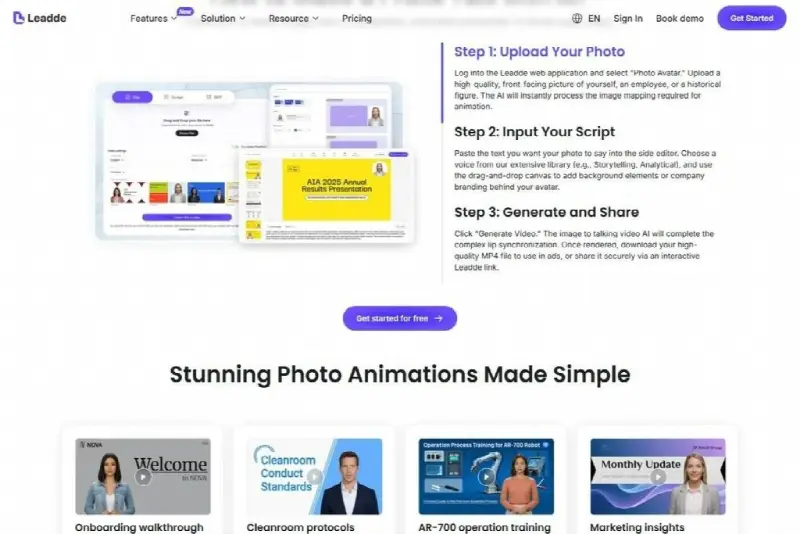
Using Leadde.ai to generate a consistent 15-second presenter opening for a software release walkthrough.
2. The 35-second focused screen capture (0:15 to 0:50)
Cut directly to a 1080p capture of the exact workflow inside the application. Keep the spoken narration continuing underneath the screen recording or switch to scene-by-scene callouts that highlight only the three clicks required to configure the feature. Zoom in on configuration modals or terminal outputs so developers watching on a laptop screen do not have to squint at 12-pixel text.
3. The 10-second verification and docs link (0:50 to 1:00)
Return briefly to the presenter card or a clean summary slide that states how the user can verify the setup worked (for example, checking for a 200 OK webhook response in the audit log) and points directly to the written documentation page for copy-paste code snippets.

Standardizing short release videos makes sprint handoffs clearer for customer success, sales engineering, and enterprise admins.
Technical checklist for SaaS demo hygiene
Before embedding a talking-portrait demo in your changelog, docs portal, or in-app tooltip, run a quick four-point quality check:
- Sanitize staging credentials and customer data: Never show real API keys, internal admin URLs, or identifiable customer email addresses in the screen-capture layer. Use a dedicated demo tenant with realistic sample data.
- Spell out acronyms phonetically in the audio script: Technical terms like OAuth, PostgreSQL, kubectl, or SAML can trip up automated pronunciation if left ambiguous. Write phonetic hints in the voice script while keeping the standard spelling in the visible captions.
- Obtain team likeness sign-off: If the talking portrait features a real product manager or developer advocate on your staff, document written consent covering where the clips will be hosted and how the assets will be retired if the employee changes roles.
- Provide a text fallback: Always pair the embedded video with the exact CLI commands, JSON payload examples, and step-by-step text instructions underneath so engineers can copy code without pausing the video player.
Also Read: Fewer Tabs, Fresher Adverts: What Job Posting APIs Mean for UK Recruitment Teams
Using Talking Photo AI for Software Demos and Sprint Release Walkthroughs


Using Talking Photo AI for Software Demos and Sprint Release Walkthroughs
Adopting talking photo ai for software demos lets product managers, developer advocates, and solutions engineers add a consistent human presenter…

How to Update Your Resume After a Layoff
It often starts with a fifteen-minute calendar invite called “Quick sync” and an HR person you’ve never met on the…