


Software teams can build an interface, connect an API, and test a user journey within days. The process becomes more complicated when the product depends on three-dimensional content.
A game prototype may need props and environment objects. An ecommerce application may require a rotating product viewer. An education platform may need an anatomical model, while an AR concept may depend on placing a virtual object in a real environment.
Developers can use simple cubes and placeholder images during the earliest stages, but these rarely show how the final experience will behave. A realistic 3D asset affects loading time, camera controls, lighting, interaction, layout, and device performance.
Waiting for a complete professional model can also slow down the prototype.
AI-generated 3D offers another option. It allows development teams to create an initial asset, place it inside the product, and test the idea before deciding whether the model deserves professional production work.
The goal is not to replace 3D artists. It is to prevent the absence of final assets from blocking early product validation.
Why 3D Can Slow Down Prototyping
Most interface prototypes can rely on standard components.
Developers already have access to buttons, form elements, icon libraries, stock images, and frontend frameworks. Even unfinished content can usually be represented with a temporary placeholder.
Three-dimensional features are different.
A placeholder cube may confirm that a viewer loads, but it cannot reveal:
- Whether the intended model is too complex
- How textures affect loading time
- Whether users understand the rotation controls
- How much screen space the object requires
- Whether the camera angle feels natural
- How the model behaves on a mobile device
- Whether 3D actually improves the experience
The development team may also be waiting for an artist, outsourcing provider, or client to supply the asset.
By the time the final model arrives, the team may discover that the interaction is unnecessary, the page is too slow, or the original product idea has changed.
Prototype-level 3D assets help expose these problems earlier.
Decide What the Prototype Needs to Prove
Before generating anything, define the question the prototype should answer.
Examples include:
- Can users rotate and inspect a product easily?
- Does an AR object remain stable when placed in a room?
- Can students understand a process more clearly in 3D?
- Does a game mechanic still feel enjoyable with realistic props?
- Can the application load several models on an average phone?
- Does the interface need a full interactive model or only a rendered animation?
The required asset quality depends on the question.
A model used to test camera controls does not need polished materials. A product viewer may require more accurate proportions and textures. A character animation test needs suitable geometry and a working rig.
Defining the purpose prevents the team from spending too much time improving an asset that is only meant to answer one early product question.
Generate the First Asset From Text or Images
Development teams can begin with either a written description or a visual reference.
Text-based generation
Text is useful when the team only has a concept.
A developer might need:
- A low-poly treasure chest
- A futuristic desk lamp
- A stylized robot assistant
- A wooden classroom model
- A sci-fi storage container
- A simple museum exhibit object
An AI 3D generator can turn that description into an initial model that is more useful than a generic cube.
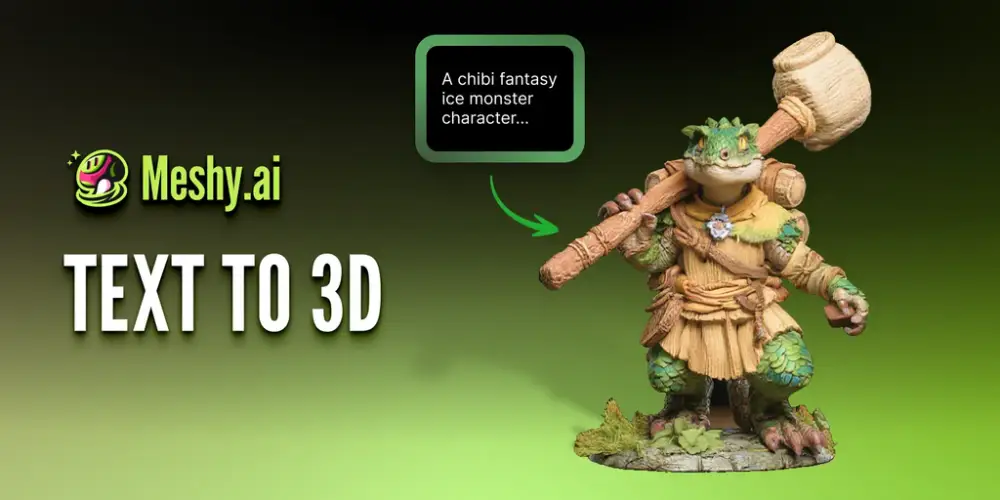
The prompt should describe the object’s form, style, materials, and intended level of complexity. A short but specific description is often more useful than a long list of conflicting details.
Image-based generation
Images are more appropriate when the team already has:
- Product photographs
- Concept art
- Design sketches
- AI-generated illustrations
- Architectural references
- Existing marketing renders
A clear reference with one visible subject and a simple background usually provides a stronger starting point.
Platforms such as Meshy AI can help developers create a preliminary model without starting from an entirely manual modeling workflow.
The output should still be considered prototype material. A generated model may look convincing from one angle while containing incorrect geometry, missing details, or invented surfaces elsewhere.
Inspect the Asset Before Importing It
Do not immediately place the first generated file into the application.
Open it in a 3D editor or viewer and inspect the complete object.
Check:
- Model orientation
- Real or relative scale
- Mesh continuity
- Missing surfaces
- Floating components
- Distorted parts
- Texture alignment
- Material count
- Polygon count
- Unnecessary hidden geometry
- Origin and pivot position
The origin matters more than it may appear.
A poorly placed pivot can make a product rotate around the wrong point. Incorrect orientation can cause an AR object to appear on its side. Inconsistent scale may create problems when several assets share the same scene.
Prototype assets do not need to be perfect, but they should be stable enough to test the intended function.
Choose a Suitable File Format
The correct format depends on the development environment.
GLB and glTF
GLB and glTF are common choices for browser-based and lightweight interactive experiences. They can package geometry, materials, textures, and animations in a format that works well with many web 3D frameworks.
FBX
FBX is widely used in game engines and animation workflows. It can carry models, rigs, and animation data, although materials may require adjustment after import.
OBJ
OBJ has broad compatibility and is useful for static geometry. Its support for modern materials and animation is more limited.
STL
STL primarily stores geometry and is commonly associated with 3D printing. It is generally not the best choice for textured web or application content.
Choosing a format should not be treated as a final production decision during an early prototype. The immediate goal is to use a file that imports reliably and supports the feature being tested.
Import the Asset Into the Prototype
The same asset can be tested in several environments.
Web applications
Three.js and Babylon.js can display interactive models inside a browser. Developers can test camera movement, lighting, user controls, annotations, and responsive layouts.
Unity and Unreal Engine
Game engines are useful for games, simulations, AR, VR, and interactive training products. Imported models may need new materials, colliders, scale adjustments, or level-of-detail settings.
Mobile applications
A mobile product viewer or AR prototype should be tested on average consumer devices, not only on a powerful development machine.
Frontend frameworks
React and other frontend frameworks can integrate 3D libraries and reusable viewer components. The team should still keep the overall page structure accessible and easy to navigate.
Design prototypes
Not every concept needs a live model. A rendered turntable video or image sequence can be placed inside Figma or another interface prototype when the team only needs to test the visual idea.
Using pre-rendered content can be a smart choice when full interactivity is not yet central to the question being tested.
Optimize for Real Devices
A generated model may be too heavy for a website or mobile application in its original form.
Common optimization steps include:
- Reducing unnecessary polygons
- Removing invisible geometry
- Compressing textures
- Reducing excessive texture resolution
- Merging repeated materials
- Using simpler shaders
- Limiting simultaneous models
- Loading assets only when needed
- Providing a static fallback
- Testing on slower connections
A desktop browser on a development machine may hide performance problems that become obvious on an older phone.
Monitor:
- Initial page load
- Model loading time
- Frame rate
- Memory use
- Interaction delay
- Battery consumption
- Device temperature
The prototype should provide enough realism to test the feature without creating a false impression of production performance.
Add Interactions Gradually
It is tempting to add rotation, zooming, hotspots, animation, AR placement, and customization at the same time.
A better approach is to test one interaction at a time.
Begin with basic loading and camera controls. Then add product annotations, animation, colour switching, or AR placement only when the previous layer works reliably.
This makes technical problems easier to identify.
It also helps the product team learn which features users actually value. A simple rotation may already answer the customer’s main question. Additional controls can add complexity without improving the experience.
Know When the Asset Needs Professional Work
AI-generated assets are especially useful during concept development, internal demos, technical experiments, and early user testing.
They are less suitable as untouched final assets when the product requires:
- Accurate brand representation
- Clean topology
- Complex animation
- Facial performance
- Precise collision
- Consistent art direction
- Multiple levels of detail
- Verified dimensions
- Engineering accuracy
- High-end commercial rendering
Once a prototype proves that the 3D feature is valuable, a professional artist can rebuild or refine the important assets.
This is more efficient than commissioning every model before the team knows whether the product idea works.
A Practical Workflow for Development Teams
A useful process can follow these steps:
- Define the feature or product question being tested.
- List only the 3D assets needed for that test.
- Create the first models from text or reference images.
- Inspect geometry, scale, orientation, and materials.
- Export a format supported by the target environment.
- Reduce unnecessary geometry and texture size.
- Import the asset into the application or engine.
- Test loading, interaction, and device performance.
- Gather feedback from users and internal teams.
- Professionally refine only the assets that survive validation.
This approach keeps the prototype focused on product learning rather than asset perfection.
Prototype the Experience Before Perfecting the Asset
The purpose of a prototype is to reduce uncertainty, not to imitate a finished product in every detail.
A development team does not need a final production model to learn whether a product viewer is useful, an AR interaction feels natural, or a game mechanic performs well. It needs an asset that is realistic enough to expose practical problems involving loading, controls, layout, and device performance.
AI-generated 3D makes this kind of testing easier to begin. Developers can move beyond generic cubes, test the experience under more realistic conditions, and identify which assets are worth further investment.
The important step is not simply generating the model. It is using that model to answer a clear product question.
FAQs
Can developers create 3D assets without modeling experience?
Developers can create and integrate prototype-level assets without advanced modeling skills. However, a basic understanding of file formats, scale, materials, geometry, and performance optimization is still useful.
Which 3D format works best for web applications?
GLB and glTF are often practical choices because they can carry geometry, materials, textures, and animation in formats supported by many web 3D frameworks. The final decision depends on the project and its technical requirements.
Are AI-generated 3D models ready for production?
Most are better treated as starting points. Production assets may still require work on topology, textures, collision, animation, branding, scale, and device performance.
Can AI-generated models be imported into Unity or Unreal Engine?
Yes. Supported formats can be imported into both engines, but developers should inspect orientation, scale, materials, collision settings, polygon count, and rigging after import.
Also Read: How Generative AI Is Changing Digital Marketing Strategies in 2026


How Cultural Organisations Can Build a Useful Guest-Publishing Strategy
Guest publishing can help a cultural organisation reach people beyond its own website, but the value depends on more than…

Using Nano Banana: When to Generate, Edit, or Remove a Background
Imagine preparing three images for a shop that sells desk lamps: a reading-corner illustration for its blog, a product photograph…