

Magento stores an enormous amount of business-critical data in MySQL: product catalogs, customer records, orders, inventory, pricing rules, and everything that keeps an online store running. Its database schema follows the Entity-Attribute-Value (EAV) model alongside module tables, database indexes, and constant writes from active storefronts. When that MySQL database gets corrupted, Magento doesn’t always tell you directly instead you start seeing symptoms that can be hard to trace back to their real cause: a 500 internal server error, blank category pages, orders that won’t load, or a checkout that silently fails.
This review covers what MySQL corruption actually means in a Magento context, how to confirm it, the two native recovery methods worth trying first, and how Stellar Repair for MySQL handled the recovery when both of those methods ran out of road. It’s also available as a free MySQL recovery tool that lets you repair and save up to 500MB of data at no cost.
What MySQL Database Corruption Means for a Magento Store
At the storage level, corruption means the physical database files are damaged. This could be a corrupted InnoDB tablespace (.ibd file), a damaged ibdata1 system file, a crashed MyISAM table, or a broken .frm file that prevents Magento from reading the table definition it expects.
Magento rarely surfaces the underlying MySQL error directly. What you see instead are application-level symptoms that all trace back to the same root problem:
- Re-indexing jobs fail or hang with no clear error message
- Product category pages load blank or return a 500 error
- Order management in the admin panel fails to load
- Checkout process breaks at the payment or order confirmation step
- Magento cron jobs stop completing successfully
Any one of these on its own might point to a configuration issue. Several of them appearing together after a server event a crash, a hardware fault, a power cut points to database corruption.
Common Causes of Magento MySQL Database Corruption
- Abrupt MySQL or server shutdown during an active write operation
- Server disk running out of space mid-write
- A KILL statement or forced MySQL process termination during a long-running query
- Hardware failure storage drive faults or controller issues
- MySQL, MariaDB, or Magento upgrades performed without schema compatibility checks
How to Check Whether Your Magento MySQL Database Is Corrupted

Before attempting any repair, confirm that corruption is actually the problem. There are two ways to do this.
Option 1 – Use the n98-magerun2 Database Check Tool
n98-magerun2 is a community-developed command-line utility specifically built for Magento. It scans MySQL tables for integrity errors and is the cleanest way to identify corruption across the full Magento schema:
n98-magerun2.phar db:maintain:check-tables
It will return a status for each table. Any table returning anything other than OK is a candidate for repair.
Option 2 – Use MySQL’s Native CHECK TABLE Command
If n98-magerun2 isn’t available, connect to MySQL directly and run CHECK TABLE on the specific tables showing symptoms:
mysql -u root -p
CHECK TABLE catalog_product_entity;
A result of OK means the table is healthy. Anything else confirms corruption. You can also check the MySQL error log to identify which tables are involved.
Methods to Repair and Recover the Magento MySQL Database
Once corruption is confirmed, try these two methods before reaching for a dedicated repair tool.
Method 1 – Restore from a Recent Backup
If a clean, recent backup is available, restoring it is the fastest path back to a working store. The process involves enabling Magento maintenance mode first to keep customers off the store while the restore runs, then dropping and recreating the database and importing the dump file:
bin/magento maintenance:enable
DROP DATABASE db_name;
CREATE DATABASE db_name;
mysql -u root -p db_name < dump.sql
After the import completes, flush the Magento cache and delete the generated/ folder so Magento regenerates its required files. Verify the store is working before disabling maintenance mode.
The critical limitation: this only works if your backup is recent and the dump file itself is readable. A backup from three days ago means three days of orders, customers, and catalog changes are gone. And if the backup was taken while corruption was already present, restoring it brings the same problem back.
Method 2 – Recover InnoDB Tables with innodb_force_recovery
When InnoDB tables are inaccessible and there’s no usable backup, innodb_force_recovery lets MySQL start in a limited mode that bypasses certain consistency checks. Add the following to the [mysqld] section of your MySQL configuration file, increasing the value incrementally from 1 until the server starts:
[mysqld]
innodb_force_recovery = 1
service mysql restart
Once the server starts, dump the accessible tables before doing anything else. Because Magento tables reference each other through foreign keys, you need to disable foreign key checks before importing any dump, or MySQL will block operations that touch parent tables before their children are in place:
SET FOREIGN_KEY_CHECKS=0;
mysqldump -u user -p database_name table_name > single_dbtable_dump.sql
Warning: Values of 4 or higher can cause data loss. Only use the minimum value needed to start the server. Once the dump is complete, remove innodb_force_recovery from the configuration file, restart MySQL normally, re-enable foreign key checks, and reimport the dump.
This method hits a wall when the system tablespace (ibdata1) or the data dictionary is damaged. In those cases, innodb_force_recovery fails to start MySQL at any level, and the dump commands have nothing to export.
When Both Methods Fail: Using Stellar Repair for MySQL
The server went down during a flash sale the worst possible timing. The MySQL process was killed mid-write when the disk filled up, and when it came back up the catalog_product_entity and sales_order tables were corrupted. The backup was four days old. Restoring it meant losing every order placed since then, which wasn’t acceptable. innodb_force_recovery got the server running at level 2, but the two most critical tables still couldn’t be dumped cleanly mysqldump aborted with errors on both.
That’s the point where we brought in Stellar Repair for MySQL. Here’s how the recovery went.
Stellar Repair for MySQL: Step-by-Step Recovery
Step 1 – Stop MySQL and Open the Tool
Stop the MySQL service before launching Stellar Repair for MySQL. The tool reads directly from the physical data files on disk .ibd files, ibdata1, .frm, .MYD, .MYI and MySQL holds locks on them while it’s running. Even if MySQL is already failing to start, confirm the service is stopped before proceeding. On Linux, stop it via the service manager. On Windows, stop it from the Services panel or command line.
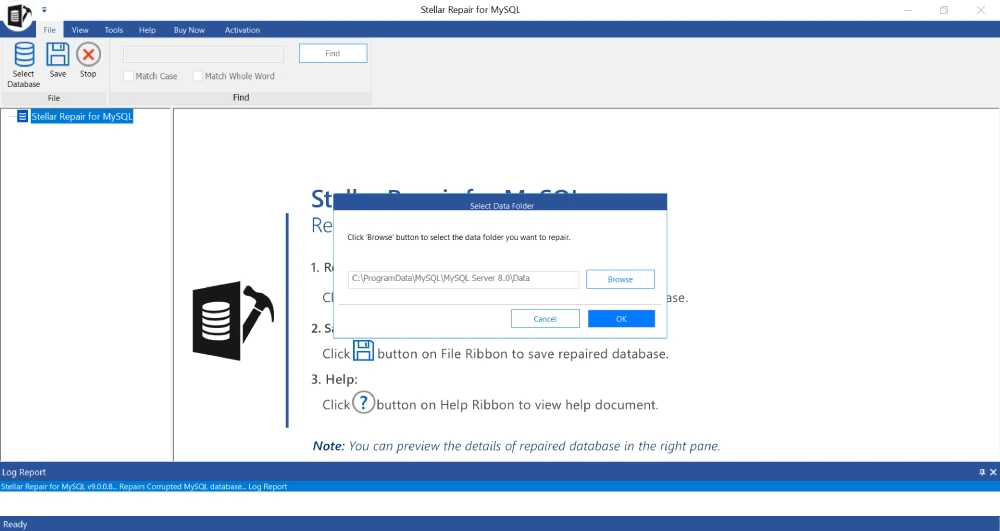
Open the tool and click Browse to navigate to the MySQL data directory. On Linux this is typically /var/lib/mysql/. On Windows it sits inside ProgramData, which is hidden by default enable hidden folder visibility in Explorer first.
Step 2 – Select the Corrupted Magento Database
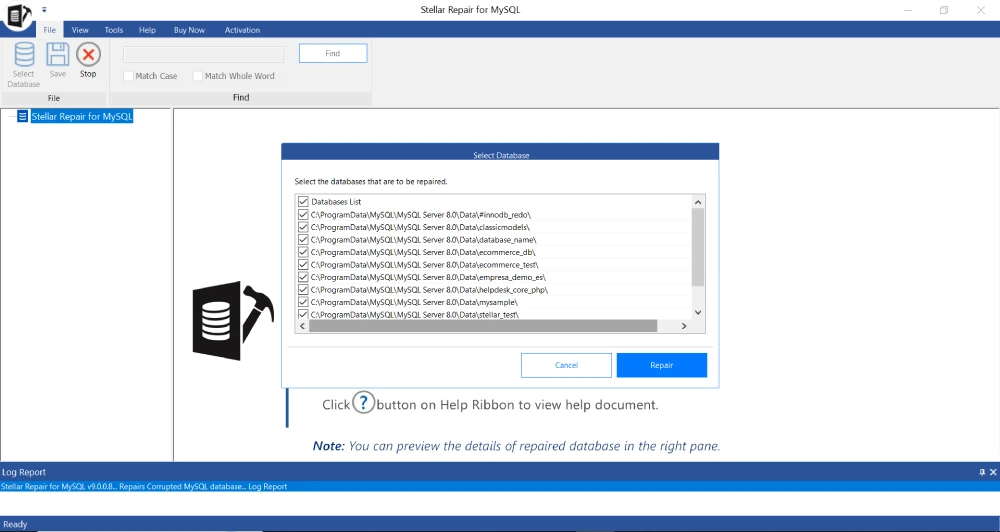
After loading the data directory, Stellar scans and lists every database found inside. Select the Magento database. If your Magento setup uses multiple databases some setups split the main database from the sales data or indexer tables select all the affected ones and run the repair in a single batch.
Step 3 – Run the Repair Scan
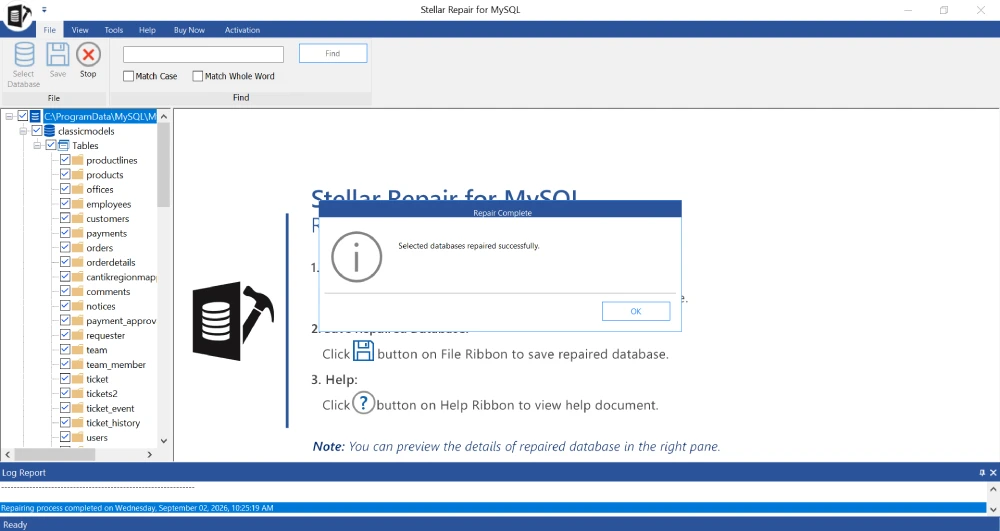
Click Repair to start. The tool works through the selected database files and displays a progress indicator tracking the current stage. For a Magento database of typical size, this takes a few minutes. No configuration is needed mid-scan. A completion notification confirms when the scan is done.
Step 4 – Preview the Recovered Magento Tables
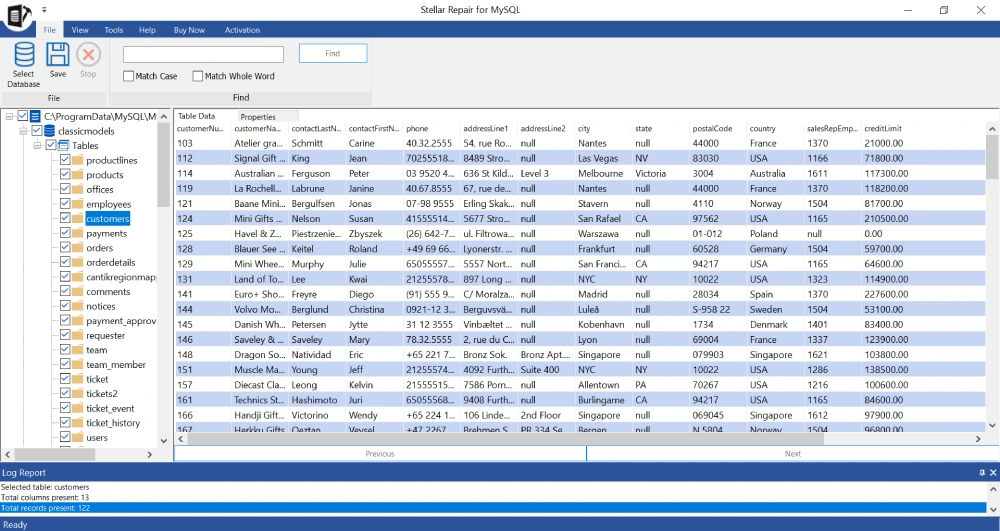
Before a license is needed, the free version opens a full tree view of everything recovered: tables, indexes, triggers, views, stored procedures including Magento’s foreign key constraints. Click into individual tables to see actual row data. The two tables that mysqldump had failed on catalog_product_entity and sales order both appeared with their records intact in the preview. Seeing the actual order rows before paying for anything made the decision straightforward.
Step 5 – Export the Repaired Database and Restore the Store
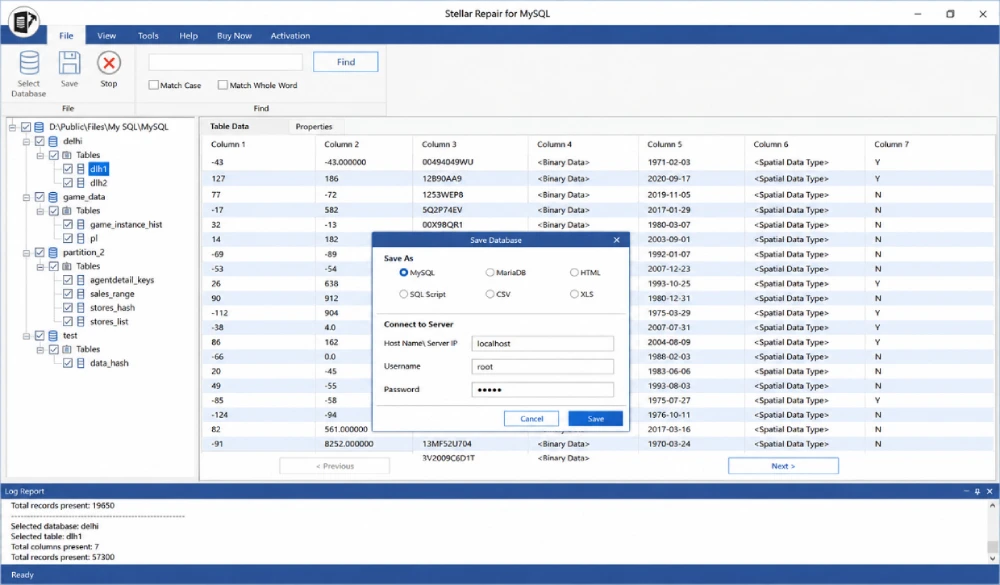
With a license activated, the repaired database exports in five formats: SQL script, directly into a running MySQL or MariaDB server, CSV, HTML, or XLS. We used the SQL script option to review the output before touching the live database. The exported SQL already includes the correct foreign key structure, so there’s no need to manually toggle SET FOREIGN_KEY_CHECKS the script handles it in the correct order. After importing and running bin/magento cache:flush, the store came back up with all orders, products, and customer data intact.
Features Worth Knowing About
- Repairs both InnoDB and MyISAM tables Magento uses both depending on version and configuration
- Recovers ibdata1 and. ibd tablespace files directly the exact files that Magento’s InnoDB tables depend on
- Restores foreign key constraints, views, stored procedures, and triggers alongside table data critical for Magento’s heavily relational schema
- No file size limitations production Magento databases can be large; the tool doesn’t cap out
- Batch repair across multiple databases in a single session useful for Magento setups with split databases
- Supports MySQL 5.0 through 9.5 and MariaDB up to version 11.8.3
- Runs natively on both Windows and Linux servers
- Free preview before purchase confirm your Magento data is recoverable before spending anything
Pricing
Stellar Repair for MySQL is priced at $199 for a technician license and $499 for the Toolkit edition, which adds MySQL log file analysis and cross-database conversion. For a Magento store, where every hour of downtime means lost revenue and abandoned carts, a one-time $199 spend is a straightforward call. The free preview removes the guesswork run the scan, see whether your tables are recoverable, then decide.
Where It Falls Short
- Version support can lag behind MySQL’s release cycle confirm your exact MySQL or MariaDB version is within the supported range before purchasing
- In-tool guidance is thinner for Linux server environments than for Windows
- Purely reactive there’s no built-in monitoring to catch early signs of corruption before a Magento table fails
Stellar Repair for MySQL vs. Native Recovery Methods
| Stellar Repair for MySQL | Backup Restore / innodb_force_recovery | |
| Works without a usable backup | Yes repairs directly from raw files | No backup restore needs a valid dump file |
| Handles severely corrupted files | Yes even ibdata1 damage | innodb_force_recovery fails above level 4 |
| InnoDB and MyISAM support | Both engines fully supported | InnoDB via force recovery; MyISAM via myisamchk |
| Magento foreign key integrity | Preserved in export no manual SET FOREIGN_KEY_CHECKS needed | Must manually disable/enable foreign key checks |
| Data loss risk | Reads only no changes to source files | Backup restore deletes current database first |
| Preview before saving | Yes free preview before purchase | No preview overwrites directly |
| Export formats | SQL, MySQL, MariaDB, CSV, HTML, XLS | SQL dump only via mysqldump |
| Batch repair | Multiple databases in one pass | One database at a time |
| Maintenance mode required | No works offline on data files | Yes store must be offline during restore |
Conclusion
Magento MySQL corruption is high-stakes by nature. A product catalog going blank or a checkout breaking during a sale window has a direct revenue impact, and the clock starts running the moment the first customer hits an error page. A clean, recent backup is still the fastest path back to a working store, and innodb_force_recovery covers many cases where the backup isn’t viable.
But when the most critical tables orders, catalog, customer records are too damaged to dump cleanly, and a four-day-old backup means an unacceptable loss of live data, Stellar Repair for MySQL is the right tool to reach for. It recovered tables from a Magento database that mysqldump had given up on, showed the actual recovered rows before any payment was needed, and produced an SQL export that brought the store back up with all its data intact. For any team running Magento on MySQL in production, it belongs in the emergency toolkit alongside your backup strategy.
Also Read: Convert Orphaned OST to PST Without Exchange – Real Test


Fewer Tabs, Fresher Adverts: What Job Posting APIs Mean for UK Recruitment Teams
Ask any in-house recruiter or agency consultant in the UK where their week goes, and a surprising share of the…

How AI Image Generation Is Changing the Way We Create Visual Content
Creating high-quality images used to require a combination of design skills, expensive software, photography equipment, and plenty of time. Today,…