


Every brand has a cadence, the gentle thrum that dictates how it moves, speaks, and interacts with consumers. To translate that personality into visuals, it takes more than still content; it’s movement that creates emotion. That’s where intelligent creative tools like Pippit step in. With its AI video generator, brands can quickly convert static visuals into vibrant narratives that breathe and are uniquely “them. This isn’t about random transitions or flashy effects. It’s about creating motion that speaks to your tone, playful, sleek, rebellious, or calm. So, what are the brands doing that turn static images into moving pictures that know their own visual language?
The psychology of motion: what movement says about You
Consider how you identify a friend’s personality, often it’s in the way they move, not necessarily what they say. It’s the same with brands. Movement, pace, and rhythm convey confidence, humor, energy, or sophistication. A youth-oriented tech startup would experiment with bouncy cuts and snappy transitions to express innovation and optimism.
Turn stills into stories: the craft of photo-to-video
A single picture can tell a lot, but movement makes it tell us more. When you translate a still into a moving image, you’re not merely bringing pixels to life; you’re bringing memories, values, and mood to life.
This is where image to video narrative comes alive. A brand can extract preserved product images, campaign images, or even social moments and overlap them into brief, emotionally charged vignettes. A stationary perfume bottle becomes a slow-blossoming recollection. A cafe image can transform into an olfactory moment, revealing steam, laughter, and beat. By introducing transitions, zooms, and pacing that are consistent with your personality, your videos don’t merely show products, they share personality.
Tone in motion: discovering your brand’s natural rhythm
Think of your brand as music. Is it a slow jazz song or an indie anthem? The tempo of your videos should have that rhythm.
- Calm brands: Opt for slow fades, lingering shots, and soft motion blurs. The audience should feel at ease, not hurried.
- Energetic brands: Employ snappy transitions and rhythmic cuts. Keep the audience in high gear, echoing your energy.
- Sophisticated brands: Opt for minimalist transitions, no mess, only authority. Elaborate motion says a thousand words in silence.
- Playful brands: Incorporate kinetic typography or bouncy effects. Make your visuals chuckle a bit.
Motion typography: where words come to life
Captions are not just utilitarian, they’re a design aspect. You add tone to words when you animate them. For instance, a script handwritten and moving across the screen can be intimate and innovative, while uppercase letters moving in sharply can convey authority. Make your typography rhythm a part of your narrative. Every letter can breathe, slide, or bounce with intention. Keep in mind: motion communicates before the viewer even reads the words.
The ideal union: motion + message
Each excellent brand narrative discovers balance between message and motion. If your message conveys “simplicity,” your graphics should glide smoothly. If it follows “innovation,” the animation needs shock and thrill. The test is getting it just right. Ask yourself: does my motion enhance my voice, or get in its way?
Where Creativity Meets Automation: Using Pippit to Bring Motion to Life
With Pippit, it’s a mere three creative steps.
Step 1: Upload your images
Create an account or log in to Pippit and go to the media upload section under “Video generator” and hit “Add media” to upload images from your device or cloud storage, or paste a product URL in the field. Then hit “Generate” so the AI will recognize the images and create your video for you.
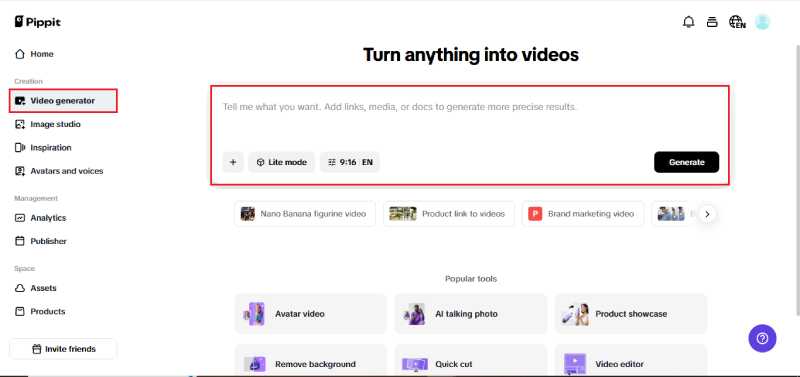
Step 2: Customize and generate
After you upload your link or media, Pippit created a preview of auto-selected clips, product highlights, and key product information. Edit and fix visual components, highlights, and descriptions. Select the type of video, and set important items like avatar, voice, aspect ratio, language, and length of your finished video. Then hit the “Generate” button to create your video.
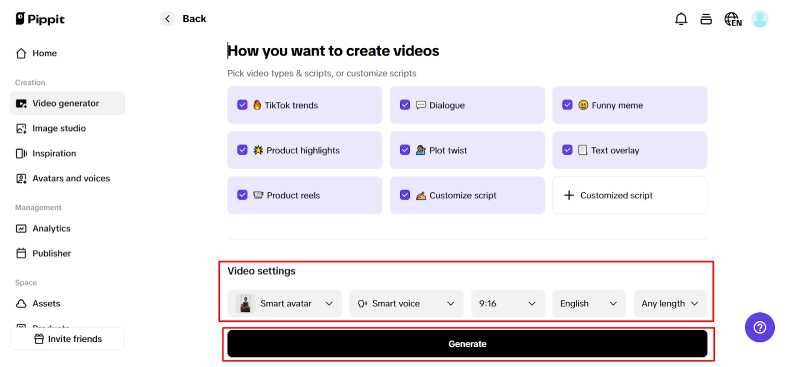
Step 3: Export the video
Preview your new video to check quality. To change the script and Caption Style, tap “Quick edit” (under the video). You’ll make small adjustments to match your vision. You may also test different video styles. We added a button “Edit more” which will allow you to adjust more technical items for your project.
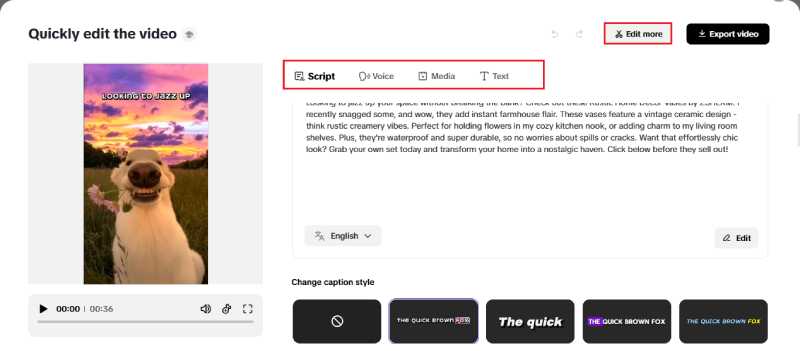
If you are satisfied, then hit “Export” and it’ll create your final videos in high-resolution.
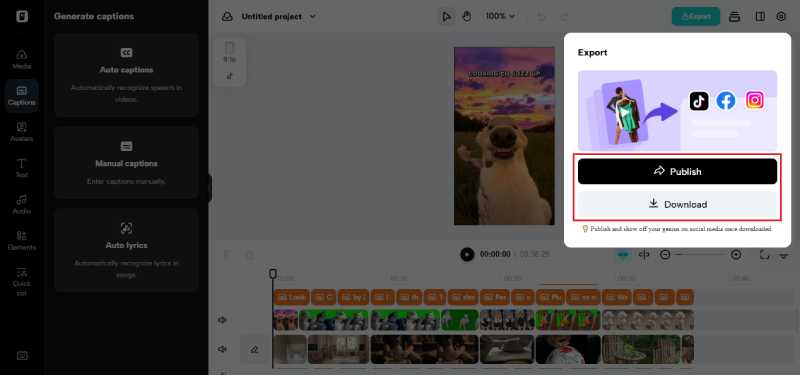
Designing with emotion: motion that feels human
Emotional design only succeeds if it’s real. Over-animated content comes off as fake. Rather, balance out. For example, a charity may apply soft motion and live voiceovers, whereas a gaming brand may use rapid cuts with engaging effects. Incorporating human touches, such as voiceovers or on-screen gestures from an AI avatar, closes the emotional divide between digital and human. It’s not animation, it’s empathy for action.
Making motion your signature
When executed well, motion is a part of your brand language, as much a part of who you are as your logo or slogan. It communicates who you are to your audience before you open your mouth. Consider motion your brand’s accent. It infuses your images with tone, charm, and significance. And once you discover your motion vocabulary, consistency is strength. Each video you release strengthens your voice and engraves emotional recall.
Last frame
Your still content can only murmur, but motion allows your brand to shout. Movement can enliven your message whether you are showcasing products, telling stories, or repurposing old messaging. With Pippit’s easy-to-use tools, you will create animated, immersive videos that encapsulate your content’s raw emotion and essence. Animate your content. Motion by motion, start creating with Pippit today.
Also Read: How Mobile-First Approaches Are Shaping Daily Living


Third-Party vs Comprehensive Insurance: Finding the Right Cover for Your Scooter
Your scooter needs reliable insurance that can provide financial protection when any unexpected situation arises. Third-party and comprehensive policies provide…

How to Compare Health Insurance Claim Settlement Ratios?
A health insurance claim settlement ratio can appear to offer a quick answer about an insurer’s reliability, but one percentage…