


Real talk. You set up your home security camera, it works fine for a week, and then one morning it just stops showing up on your phone. Or you try to host a small Minecraft server for your buddies, and the IP you gave them last weekend is useless now. You Google the problem and three acronyms bounce around like static IP, dynamic IP, DHCP. Nobody explains it like a human.
So let’s slow it down. By the end of this, you’ll know exactly what a static IP is, what a dynamic IP is, when to bother upgrading, how to set one up on Windows or Mac without breaking the rest of your network, and whether a NordVPN-style dedicated IP is actually worth your money. Coffee not included, but grab one anyway.
What is a Static IP Address?
A static IP address is a fixed address that your device keeps for as long as you tell it to. It does not change when you reboot the router, it does not change when the modem reconnects, it does not change when the kids unplug something. Same address, same number, every time.
A dynamic IP address is the opposite. Your device gets a temporary address from your router (or your ISP), keeps it for a while, and then returns it to the pool and gets a new one when the lease runs out. Most home devices sit on dynamic IPs and don’t even notice it.
The static ip idea is simple: static means stays put. dynamic means it shifts. That’s the whole trick, and once it clicks, half the rest of networking starts to make sense.
A quick sketch: Static vs Dynamic IP
| Trait | Static IP | Dynamic IP |
| Changes over time | No. Same number, every time. | Yes. Reassigned when the lease expires. |
| How it’s set | Manually, by you or the admin. | Automatically, by DHCP. |
| Best for | Servers, port forwarding, security cams, gaming hosts | Phones, laptops, tablets, smart TVs |
| Cost | Often a paid upgrade from your ISP | Included free with your plan. |
Static IP vs Dynamic IP: Which one is actually better?
Hot take: neither is “better.” They’re tools. You grab the one that fits the job, like a screwdriver vs a drill. Most people don’t need a static IP for anything. Some absolutely do.
Here’s how I walk a friend through it over the phone:
- – Speed: identical. Static vs dynamic IP makes zero difference to download or ping.
- – Security: a static IP is slightly easier to find and target once it’s known. A dynamic IP shifts, so bad actors have a harder time pinning it down. For most homes, this is not a meaningful difference.
- – Reliability for services: this is the big one. If you’re running a server, hosting a security camera, or opening ports to talk to something from outside, you need the address to stay the same. Without a static IP, your port mapping will break every time the device reconnects.
- – Convenience: dynamic wins. You don’t manage anything. Just plug in and go.
If you’re a regular home user with phones, laptops, and a gaming console, dynamic IP is what you want and you can stop reading here. If you have something that needs to be reached from the outside, keep going.
DHCP vs Static: How your router actually picks your IP
Behind the curtain, your router runs a tiny butler called DHCP – Dynamic Host Configuration Protocol. When your phone joins Wi-Fi, DHCP does a four-step handshake (Discover, Offer, Request, Acknowledge, or DORA in nerdspeak) and hands your device an address from a pool. That pool typically runs from 192.168.0.2 through 192.168.0.254 on most home routers, and it sets a lease time – usually around 24 hours on a default residential setup.
When the lease runs out, your device politely asks for a renewal. Most of the time the router says yes and gives you back the same address. But if the device is gone for a long time (off, asleep, disconnected) or the router itself restarts, you’ll likely get a different number. That’s why people say “my IP keeps changing.”
- – DHCP = the butler. Hands out addresses from the pool.
- – Static = manual. You tell the butler exactly what number to give every time.
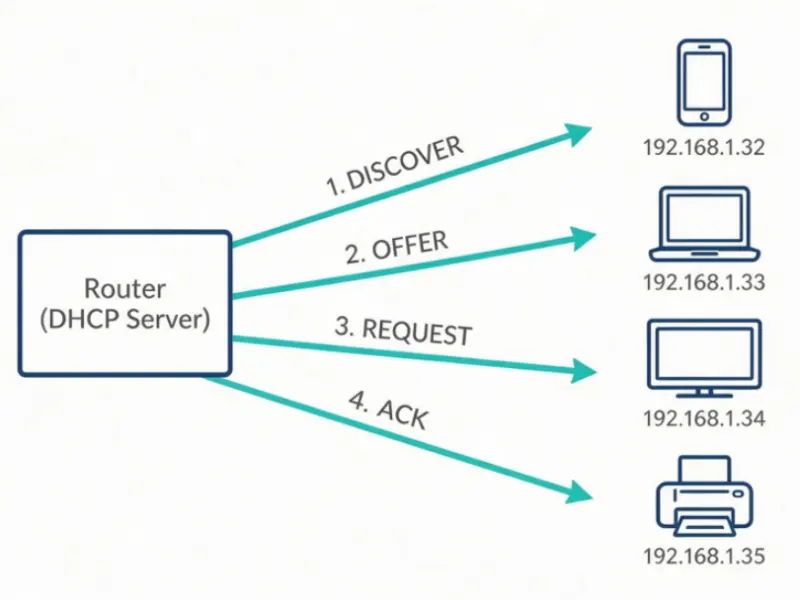
Figure 1: the four-step DORA handshake every device runs through to get a dynamic IP from your router.
Heads up: a “static IP” you set on your own device inside your home only fixes the local private IP (something like 192.168.1.10). It does not change your public IP address. Those are two totally different things, and the internet only ever sees the public one.
When you actually need a Static IP Address (and when you don’t)
Here’s the rule I’ve been using for years: if a stranger on the internet has to find your thing by typing in an address, you need a stable one. If everything you do starts on your device, you don’t.
You’ll probably want a Static IP if you:
- – Run a server from home (game server, Plex, Jellyfin, NAS, web dev).
- – Set up port forwarding and want the rule to keep working after router reboots.
- – Access a security camera or smart-home hub from outside the home.
- – Use a VPN client that needs a known remote endpoint.
- – Run a small business tool that whitelists specific IPs.
You’re totally fine on Dynamic IP if you:
- – Stream Netflix, YouTube, or play online games as a client.
- – Work remotely over a corporate VPN.
- – Browse, email, video call, and shop online.
- – Use your phone’s Wi-Fi for everything.
A small honest story here. I tried to host a Terraria server from my apartment last year. I set up port forwarding, gave my friends my IP, and we played for two solid weekends. Then my ISP rebooted the modem during maintenance and I came back to a different public IP. My friends were screaming the box is dead bro. That weekend is exactly why dynamic IP is the silent killer of home servers.
NordVPN Dedicated IP: a Static IP without paying your ISP
Here’s a thing a lot of people don’t realize: you don’t always have to beg your ISP for a static IP. Some VPN providers will sell you NordVPN dedicated IP addresses – basically, a fixed IP from their pool that only you use.
Why would you want that? Three reasons come up over and over:
- – Site whitelisting. Some sites and tools flag shared VPN IPs because hundreds of people use them. A dedicated IP is yours alone, so it looks more like a normal residential address.
- – Remote access. A small office can whitelist one IP and let you in from a coffee shop without exposing the whole network.
- – Less CAPTCHA hell. Google and Cloudflare throw fewer CAPTCHAs at IPs that behave consistently and aren’t shared by thousands of strangers.
NordVPN dedicated IP pricing, from real menus
| Plan term | Dedicated IP add-on |
| 2-year plan | about $3.69 / month |
| 1-year plan | about $5.89 / month |
| Monthly plan | $8.99 / month |
Available locations include the US (Atlanta, Boston, Chicago, Dallas, Denver, Los Angeles, Miami, New York, Seattle), plus a long list across the UK, Germany, Japan, Australia, Hong Kong, and others – around 27 countries at last count. You pick one at signup and you can change it once per subscription if you ask support.
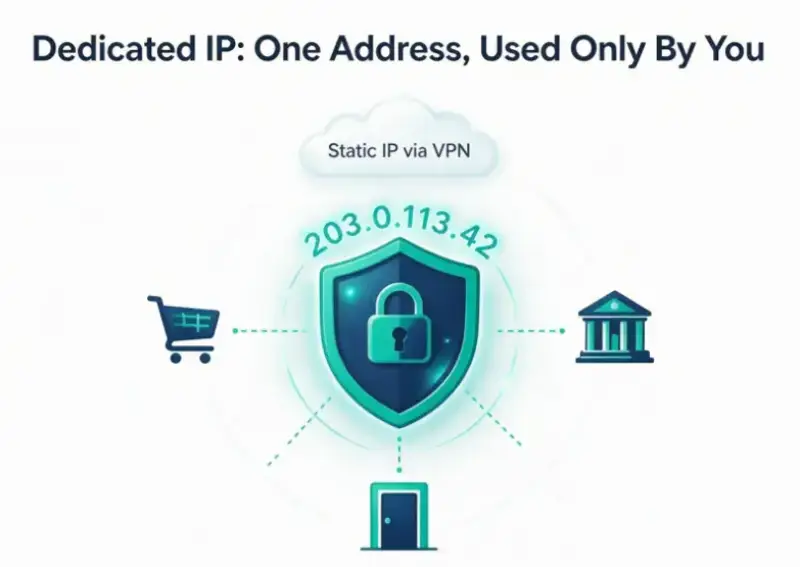
Figure 2: a dedicated VPN IP acts as one fixed, trusted entry point that only you use – no shared flags, fewer CAPTCHAs.
Honest reality check: if you just want privacy, stick with regular NordVPN. A nordvpn dedicated ip is for the specific case where a static address solves a real problem you have. It is not a magic privacy upgrade and it’s not free.
How to set a Static IP on your own device (without breaking anything)
If you only need a stable local IP for your PC or NAS, do this. Pick an address that’s outside your router’s DHCP pool (so the router doesn’t accidentally hand it to a guest device) and outside any reservation you’ve already set. Also, on a typical home router using 192.168.1.x, picking something like 192.168.1.50 works well.
On Windows 10 or 11
- – Open Settings > Network & Internet > your connection (Wi-Fi or Ethernet).
- – Click the network you’re connected to, then IP assignment > Edit.
- – Switch from Automatic (DHCP) to Manual.
- – Turn on IPv4 and fill in IP address, subnet mask (255.255.255.0 is the safe default), and gateway (your router’s address, usually 192.168.1.1).
- – If the page refuses to load afterward, you typed an address the network already used. Roll back to Automatic and try a different number.
On MacOS
- – Open System Settings > Network.
- – Click the connection you’re using (Wi-Fi or Ethernet).
- – Click Details (or Advanced on older macOS), then the TCP/IP tab.
- – Change Configure IPv4 from Using DHCP to Manually.
- – Enter your static IP, subnet mask (255.255.255.0), and router address. Save.
Pro tip: tell your router to reserve that same address via DHCP reservation. That’s usually more reliable than hard-coding it on the device, and it survives when you switch hardware. Most routers have this in the LAN or DHCP settings under a label like “Address Reservation” or “Static Lease.”
Speaking of which, if you’ve been chasing weird internet drops and your PC feels generally cranky, sometimes the underlying problem is local and not networking at all – outdated drivers, background bloat, settings gone sideways. A tool like Driver Booster (theitbase review) clears up a chunk of “why is this thing so slow” frustration without you having to dig through Device Manager. Rule out the boring stuff first, even when the problem feels network-shaped.
The thing nobody tells you: CGNAT might block you from getting a static IP
There’s a quiet thief that keeps home servers and port forwarding from working: CGNAT, or Carrier-Grade NAT. Smaller ISPs use it to share one public IPv4 address across many customers, because the world literally ran out of IPv4 addresses years ago.
If your ISP has you on CGNAT, every “public” address they give you is actually another private IP behind their big NAT. You can’t port-forward through it, and sometimes you literally can’t buy a static IP address until they take you off CGNAT or move you to IPv6.
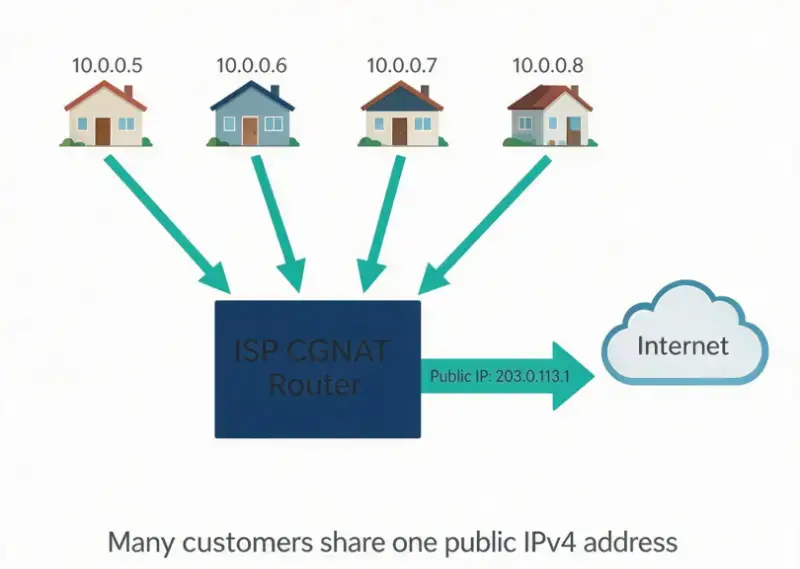
Figure 3: under CGNAT, many households share one public IPv4 address – which is exactly why port forwarding and static IPs often refuse to work.
Tell-tale signs of CGNAT: your WAN IP on the router looks like 100.64.x.x or 10.x.x.x, or you Google “what is my IP” and it shows something different from your router’s WAN page. If that matches what you’re seeing, call your ISP and ask nicely to be opted out.
Quick Recap (because we covered a lot)
- – Static IP = fixed address, set manually, doesn’t shift. Most useful when something on the internet has to reach you.
- – Dynamic IP = temporary address from DHCP, gets reassigned when the lease expires. Perfect for almost every normal home device.
- – DHCP = the automatic butler that hands out dynamic IPs and tracks them with a lease time.
- – NordVPN dedicated IP = a paid static IP routed through a VPN, useful when you want a stable address without involving your ISP.
- – Static vs. dynamic IP, in one sentence: static stays, dynamic shifts – and most of the time you want dynamic.
If you’ve been juggling these settings and your desktop is also a giant mess of icons, half-installed apps, and mysterious background processes – which has been every remote-work setup I’ve ever had – pairing network cleanup with a workspace cleanup like Desktop takes a real chunk of friction out of the day. Two different fixes, same energy.
FAQ: The Questions People Actually Search
Is a static IP faster than a dynamic IP?
No. Speed is identical for both. Static vs dynamic only changes the stability and predictability of the address, not the bandwidth or latency. If something online feels slow, the cause is somewhere else – Wi-Fi signal, ISP throttling, server load, congested hardware.
How can I tell if my IP is static or dynamic?
On Windows, open Command Prompt and run ipconfig /all. Look for the line that says DHCP Enabled. If it says Yes, your device is on dynamic. If it says No, it’s static. To check your public IP, just Google “what is my IP” and compare it to what your router’s WAN page shows.
Do I need a public static IP for port forwarding?
Yes, you need a stable public IP. Without one, port forwarding rules break the moment your WAN IP changes. Some ISPs offer a static IP add-on. Others dodge the issue with CGNAT, in which case a static IP plan or a VPN tunnel with port forwarding is your workaround.
Does a static IP make me more hackable?
Marginally, yes. A static IP is easier to find and target once it’s known. But every public IP is already visible if someone chooses to look. Use a good firewall, keep devices updated, and you’re fine on either side.
Are a static IP and a dedicated IP the same thing?
Practically, yes – both mean an address that stays the same and is assigned only to you. The label difference is mostly marketing. “Static IP” usually refers to one from your ISP. “Dedicated IP” usually refers to one from a VPN provider like NordVPN. Functionally, both give you a stable, exclusive address.
Can I set a static IP myself or do I have to call my ISP?
You can absolutely set a static local IP yourself on any device (cover gigabit Windows and Mac steps above). What you cannot do yourself is get a stable public IP – for that you either pay your ISP for a static-IP plan, sign up for a NordVPN dedicated IP, or use a tunneler that gives you a fixed remote endpoint.
Last tangent, but a useful one. Anyone building or fixing both a network and a small web presence eventually runs into the same pattern: cleaner plumbing, fewer surprises, less spec-sheet chasing. Designing a website from scratch, the practical way covers that exact trade-off in the web world, and the mindset translates. Pick the right protocols, the right tools, the right lease length, and stop overpaying for buzzwords that don’t move the needle.
So if a static IP keeps showing up in your to-do list, here’s the honest bottom line: most people don’t need one and should happily run on the dynamic side. The moment you start hosting something your friends or coworkers need to reach – a server, a camera, a Plex box – grab a real static address, either from your ISP or via a NordVPN dedicated IP if a static residential IP isn’t an option. Set your local devices to static cleanly with the steps above, and tell your router to reserve the same address via DHCP so you don’t double-book yourself later.
That is what a static IP is – it is just a fixed address instead of a shifting one. Pick the right type for the job, do the small setup work once, and stop thinking about it.


Dynamics 365 Migration: Thinks to Know Before a Single Record Moves
Most migration projects do not fail because the tooling is weak. They fail because the team treated the move as…

How to Update Your Resume After a Layoff
It often starts with a fifteen-minute calendar invite called “Quick sync” and an HR person you’ve never met on the…