

What Is a Smart TV, Really?
What is a smart tv, really? Honestly, I get why people ask this. I had the same question the weekend I bought my first one — stood in the aisle, looked at two nearly identical boxes, and realised that one had a Netflix logo on the remote and the other did not. That is the whole thing in one moment. A smart tv is a television that connects to the internet and runs apps, the way your phone does. No extra box, no laptop-on-the-coffee-table vibe. If you have ever wondered what does a smart tv do that a regular one does not — this article is for you.
Here is the deal. The screen still shows your channels, but now it can also stream Netflix, browse YouTube, mirror your laptop, talk to Alexa, and quietly get smarter every few months with a software update. Most people replace their old set every seven-ish years, so the smart you pick today will live with you a while. Worth a few minutes to actually understand it before you swipe the card.
A modern smart TV is just a screen, an internet connection, apps, and an operating system glued together.
Smart TV vs Regular TV — What’s the Real Difference?
I think the clearest way to see it is side by side. Your old TV — what we lovingly call a “dumb TV” — did one job: show whatever signal came down the cable or over the antenna. No apps, no updates, no logins. A smart TV adds internet, apps, and an operating system on top of that same panel. That is literally the equation: Internet + Apps + OS = Smart TV. Once the OS is in the picture, the whole device changes personality.
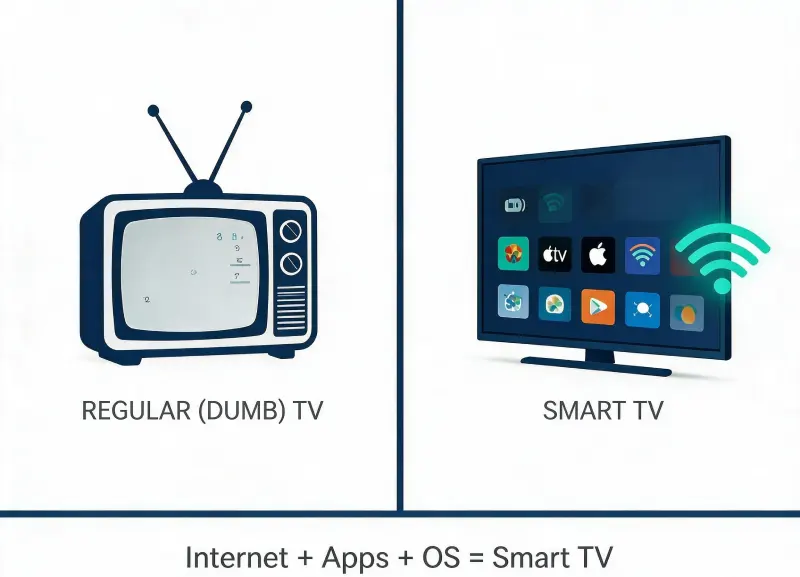
Regular TV vs Smart TV — only one of them talks to the internet.
So what does a smart tv do that a regular one cannot?
- Run streaming apps like Netflix, Disney+, Prime Video, HBO Max, YouTube — no cable box needed.
- Pull new movies and shows on demand instead of waiting for a schedule.
- Get software updates that quietly add new features over the years.
- Cast your phone or laptop screen to the TV with a tap (AirPlay, Chromecast, Miracast).
- Take voice commands through the remote (or Alexa / Google Assistant).
- Sync with your smart home — lights, robot vacuums, video doorbells.
If you are coming from a regular TV, the biggest shift is not the picture quality. It is that the television becomes a hub for everything you watch, voice-control, and throw at the wall from your phone. That alone is why most people looking at what is a smart tv features end up upgrading sooner than they planned.
How Does a Smart TV Work?
Mechanics-wise, it is plainer than the marketing makes it sound. Your smart TV is basically a small computer bolted to a big screen: a processor, memory, storage, a Wi-Fi or wired network card, plus the operating system that decides what the home screen looks like and which apps you can install. Think of it as a phone-shaped slab of glass from the 2000s, but glued to the wall.
The inputs and outputs you actually touch
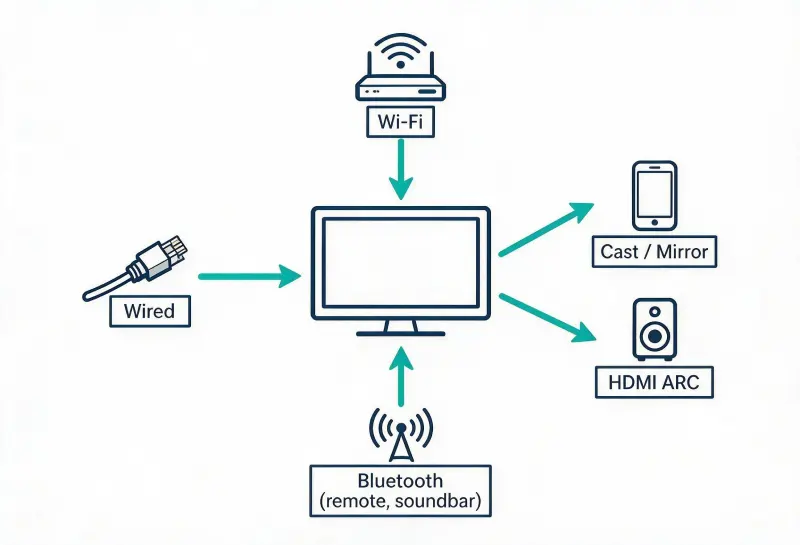
Inputs and outputs — Wi-Fi, wired ethernet, Bluetooth, HDMI ARC, and phone mirroring.
- Wi-Fi: the most common way to get online. Pulls updates, streams 4K movies, syncs your watchlist.
- Wired ethernet: same job, just over a cable. More stable for big files, zero Wi-Fi drama.
- Bluetooth: how the remote talks to the TV, and how your wireless soundbar or AirPods pair up.
- HDMI ARC / eARC: pushes TV audio down to a soundbar or home theatre in one cable.
- Cast or screen mirror: phones and laptops beam their screen to the TV over Wi-Fi.
Behind the scenes, your TV quietly logs things like what you watched last and what search term you typed. That is how the home screen learns to surface shows you might actually finish (instead of staring at a grid of 200 tiles like a video store window from 2007). It also feeds the smart home side of it — if you have a Ring doorbell or Philips Hue lights, your TV can pop a camera feed or dim the bulbs when you say so. Pretty soon it feels weird to go back.
Smart TV Features That Actually Matter
Spec sheets love to drown you in acronyms, but most buyers care about three or four things. Skip the marketing fluff and focus on this short list.
1) Screen quality
- 4K is now the baseline on anything from 43 inches up — there is no point buying 1080p in 2026.
- HDR (High Dynamic Range) matters more than raw resolution for real-world punch — Dolby Vision and HDR10+ are the formats to look for.
- OLED beats LED for dim-room movie nights; QLED / Mini-LED wins in bright living rooms.
2) The operating system
If you have ever asked yourself what does a smart tv do day-to-day, the answer is: whatever the operating system lets it do. The OS decides the app store, the remote layout, the voice assistant, and how often you get updates. More on that in a minute.
3) Streaming apps you actually use
- Make sure Netflix, Prime Video, Disney+, Apple TV+, YouTube, and Spotify are all there before you buy.
- If you cut the cord: check live TV apps like Sling, YouTube TV, or Hulu + Live TV.
- Gaming side: GeForce Now, Xbox Cloud, and Steam Link are worth looking for.
4) Voice + casting
- Voice search beats typing on a remote every single time. Period.
- AirPlay 2 if you live in the Apple world. Chromecast built-in if you live in Android.
Popular Smart TV Operating Systems Compared
When you see terms like smart tv operating system thrown around, this is what people mean — the software layer that runs the whole experience. There are actually only a handful, and each one has a personality of its own. Here is the quick version:
| Operating System | Maker | Best Known For |
| Roku TV | Roku | Simple remote and app support |
| Google TV | Universal search and recommendations | |
| Amazon Fire TV | Amazon | Alexa + Prime Video integration |
| Samsung Tizen | Samsung | Circular app wheel, snappy UI |
| LG webOS | LG | Minimalist card-based interface |
| Android TV | Large app grid and casting |
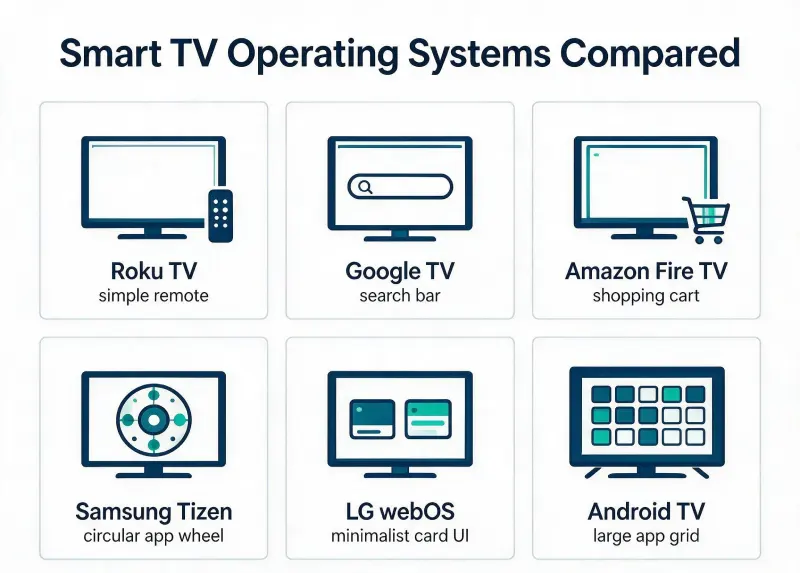
Quick visual — six smart TV operating systems, side by side.
Two quick tips here. First, if you already love a certain streaming app or smart speaker, let that decide. Buying an amazon fire tv when half your house already runs on Alexa is a no-brainer. Picking google tv if you are an Android + Chromecast household is the same logic. Second, do not chase the OS as a status symbol — a basic Roku will honestly outperform a fancy flagship for the average family.
Pros and Cons of Owning a Smart TV
What I like — the wins
- Way more stuff to watch, on demand, without a cable bill.
- One screen for streaming, casting, gaming, and even Zoom calls.
- Voice control is genuinely useful when the remote goes missing (again).
- Future-proof-ish — software updates keep your set feeling newer for a few years.
- Cheaper than ever. Decent 55-inch 4K sets now sit well under 500 dollars.
What to watch out for — the trade-offs
- Ads on the home screen. Almost every major OS shows them now. Annoying but ignorable.
- Your TV collects viewing data — read the privacy settings on day one.
- Software shelf life. Once a brand stops updating the OS, the apps slowly stop working.
- Sound is still mostly thin. Plan for a soundbar unless you sit very close.
- Internet-dependent. No Wi-Fi, you are back to dumb-TV mode.
Most of the cons have easy fixes — a 30 dollar ethernet cable kills the lag, a 200 dollar soundbar solves the audio drama, and 5 minutes in settings calms the ads. Once you have lived with one for a month, going back feels silly.
How to Pick the Right Smart TV Without Overpaying
I have gone through this loop a couple of times now. The list below is the shortcut — the stuff I wish someone had told me before round one.
Step 1 — measure first, browse second
- Pick the screen size based on seating distance: 55″ for ~7 ft, 65″ for ~9 ft, 75″ for ~11 ft.
- If the wall is small, a 50″ will beat an awkwardly cramped 65″ every time.
Step 2 — pick the OS before the brand
If you want the easiest day-one experience, lean Roku TV or LG webOS. If you want recommendation smarts, Google TV is hard to beat. Also, if your house is already Alexa, Amazon Fire TV. If you want the most apps and gaming flexibility, Android TV has the deepest library.
Step 3 — chase HDR over raw resolution
A mid-range 4K panel with Dolby Vision looks better than a flagship 8K without it. Resolution without contrast is just extra pixels doing nothing.
Step 4 — budget for the extras
- A soundbar. Even a cheap one. Adds more “wow” than any spec bump.
- A wall mount or sturdy stand. Read the weight limit before you trust it.
- Surge protector. TVs do not love power spikes.
Quick Smart TV FAQ
Is a smart tv the same as an Android TV?
Almost, but not exactly. Android TV is a specific operating system made by Google. A smart TV is the broader category — any TV with internet and apps. Samsung, LG, and Roku run their own OS, so they are smart TVs, just not Android TVs.
Do I still need cable if I get a smart tv?
Nope. That is the whole point of the upgrade. Pair the TV with a live TV streaming app (YouTube TV, Sling, Hulu + Live) and you can replace most cable packages for under 80 dollars a month. Plenty of folks — me included — cut the cord on day one.
How long does a smart tv usually last?
The panel itself is good for 7–10 years. The software side typically feels fresh for about 4–6 years before the OS slows down on updates. Bigger brands (Samsung, LG, Sony) tend to support longer than off-brand sets, if you care about long-term smart tv features.
What is a smart tv box — is that different from a smart tv?
A smart tv box (Apple TV 4K, Chromecast, Fire TV Stick, Roku) is the small streaming stick or box you plug into a regular TV to give it smart features. Useful when you love your old TV but want the apps. A smart TV has all of that built in.
Wrapping It Up — Should You Get One?
If you have made it this far, you already know the answer. Almost everyone buying a new TV today ends up with a smart one because, frankly, the non-smart option is basically an antique. Pick the OS that fits your phone and your streaming habits, grab a soundbar while you are at it, and you are set.
If you want a deeper walk-through on specific models, head over to our TV buying guide on theitbase.com — it pairs nicely with this one. And if streaming subscriptions are confusing, our streaming services explainer breaks down which one is worth it in 2026. You can also check out our homepage on theitbase.com for the rest of the smart-home coverage.
Bottom line — sooner or later you are going to buy one, so go in with eyes open. Pick the right size, the right operating system, and the apps you actually use. Do that, and the picture almost takes care of itself. What is a smart TV? It is the easiest screen in your home to actually love.
Related Post: What is a Static IP: (and why yours keeps changing on you)


Dynamics 365 Migration: Thinks to Know Before a Single Record Moves
Most migration projects do not fail because the tooling is weak. They fail because the team treated the move as…

How to Update Your Resume After a Layoff
It often starts with a fifteen-minute calendar invite called “Quick sync” and an HR person you’ve never met on the…