

The Samsung Galaxy A13, a popular and reliable budget smartphone, features the robust security systems synonymous with the Samsung brand. One of the most effective security features is the Factory Reset Protection (FRP) lock. FRP, first introduced with Android 5.1 (Lollipop), is a mandatory security measure designed to prevent unauthorized access to a device after an untrusted factory reset (one performed outside of the Settings menu).
If a Samsung A13 is reset via Recovery Mode or another method, the FRP lock activates, displaying the “Verify your account” screen. The phone then demands the credentials of the last synchronized Google account before it can be set up again. While this is an excellent anti-theft measure, it becomes a severe obstacle for legitimate owners who have forgotten their old account details, purchased a second-hand device not properly wiped, or inherited a phone from someone who cannot provide the necessary login information.
Given the continuous security updates pushed by Google and Samsung, particularly on newer Android versions running on the A13, manual FRP bypass methods—which often rely on complex bugs, dialer codes, or TalkBack exploits—are frequently patched and rendered useless. Therefore, a modern, reliable, and user-friendly solution, such as the DroidKit FRP Bypass Tool, is the most recommended path for Google FRP lock bypass.
Understanding the Samsung A13 FRP Challenge
The Samsung A13 runs on recent versions of Android (often Android 12, 13, and higher), which means the FRP security is highly refined. These newer security patches eliminate the simple “tricks” that worked on older devices:
- No Simple Google Link: There is no easy “Forgot Password” link on the setup screen to reset the Google account.
- Patched Exploits: Methods involving inserting a SIM card with a blocked PIN, using the Emergency Call screen, or accessing YouTube via accessibility settings are almost always patched in the latest security updates.
- The Official Stance: Samsung’s official method requires the user to remember the credentials or, if they are the original owner, present proof of purchase at an authorized service center—a process that is often time-consuming and inconvenient.
When faced with a complex security wall on a modern device like the A13, a dedicated software solution that can interact directly with the system files is necessary.
iMobie DroidKit: The Professional Solution for Samsung FRP
iMobie DroidKit is an all-in-one Android toolkit that provides a specific and frequently updated FRP Bypass feature. This tool is designed to work with the latest Samsung models, including the Galaxy A13, and its various Android versions, making it the most reliable PC-based solution available in 2025.
Key Advantages of DroidKit for A13 FRP Bypass:
- Tailored Solutions: DroidKit offers brand-specific bypass methods, including a detailed protocol designed just for Samsung devices running current Android operating systems. This is vital because the FRP structure varies significantly between manufacturers.
- No Technical Expertise Needed: The software automates the complex technical process, guiding the user through the necessary steps (like entering Download Mode) without requiring manual flashing or complex code manipulation.
- High Success Rate: By continuously updating its algorithms to counter new security patches, DroidKit maintains one of the highest success rates for bypassing FRP on popular devices like the A13.
The DroidKit FRP Bypass Process for Samsung A13
The procedure is straightforward and requires a computer (PC or Mac) and a USB cable:
- Launch and Connect: Install and launch DroidKit on your computer. Select the “FRP Bypass” feature and connect your locked Samsung A13 to the computer.
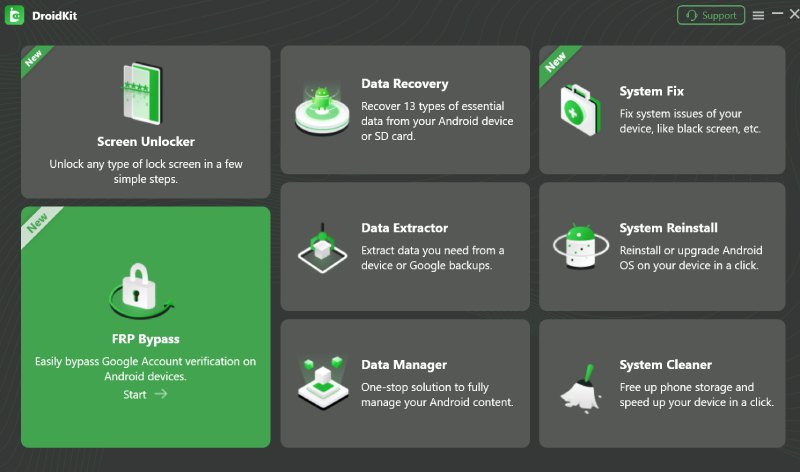
- Prepare Firmware: DroidKit will automatically detect your device and prepare a firmware package designed specifically for your A13 model and its current Android OS version.
- Enter Download Mode: The software will display simple, visual instructions on how to put your Samsung A13 into Download Mode (the essential state for system interaction). This usually involves a specific combination of the Volume and Power buttons.
- Bypass Execution: Once the device is in Download Mode, DroidKit initiates the bypass process. It installs the prepared file to remove the FRP lock mechanism. The status bar will show the progress.
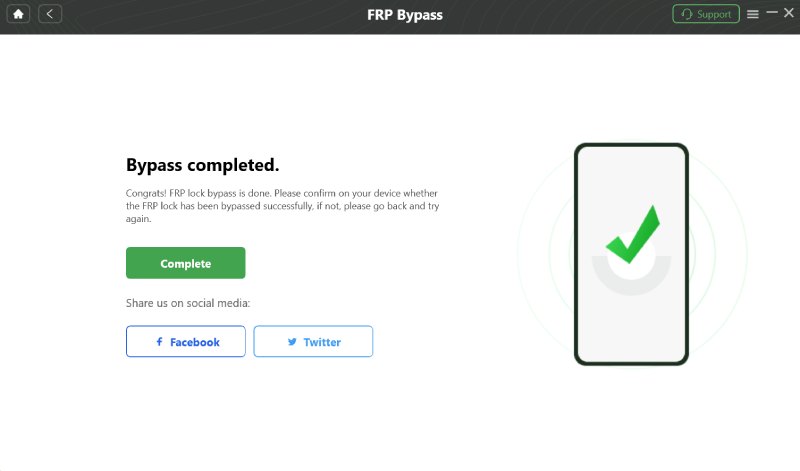
- Restart and Access: After the process is completed, the phone will automatically restart. Crucially, the Google account verification screen will be gone, allowing you to set up the phone as if it were a brand new device.
Critical Considerations
While DroidKit offers a clean and effective bypass, users must be aware of the following:
- Data Erasure: For security reasons, the FRP bypass process often requires a device wipe to completely remove the lock and associated data. Therefore, all un-backed-up data on the Samsung A13 will be erased during the process. The purpose of this tool is to regain access to a locked phone, not to preserve un-backed-up data.
- Legitimate Use Only: The DroidKit FRP Bypass Tool is intended strictly for the legitimate owners of the Samsung A13 who have lost their own credentials or acquired the device legally. Using such a tool for any illegal activity, such as bypassing security on a stolen device, is prohibited and unethical.
Conclusion
In conclusion, attempting manual FRP bypasses on the modern Samsung Galaxy A13 is a constant battle against evolving security patches. For a reliable, time-saving, and non-technical solution, the DroidKit FRP Bypass Tool is the definitive choice. It provides a guided, automated process to swiftly remove the Google account lock, restoring full usability to your device.
Also Read: How to Create a Free Digital Business Card in Minutes: A Simple Tech Guide


10 Cloud Migration Best Practices for a Successful Migration
Cloud migration has become a strategic priority for organisations looking to improve scalability, reduce infrastructure costs and modernise ageing IT…

What Makes Luxury Villa Communities Ideal for Modern Families
Finding a home has a lot more to do with selecting a beautiful building. Families tend to seek an environment…